Form2Cal creates Google Calendar events from Google Form submissions
Connect a Google Form to Calendar, map your form fields once, and let new responses create clean calendar events without copy and paste.
Form2Cal
Google Workspace add-on for form-to-calendar automation.
Automatically create Calendar events from Google Forms
Watch how Form2Cal connects Google Forms responses to Google Calendar, then use the setup guide to configure your own form.
Compare your options
Google Forms to Calendar: compare your options
Form2Cal, Zapier, and Make can all turn a form response into a calendar event. The useful difference is where you set up the workflow and how much else you need it to do.
| What matters | Form2Cal | Zapier / Make | Custom Apps Script |
|---|---|---|---|
| Where you configure it | Inside Google Forms | A separate automation builder | The Apps Script editor |
| What you set up | Calendar selection and form field mappings | App connections, a trigger, an action, and field mappings | Code, permissions, and a form-submit trigger |
| Writing code | Not required | Not required for this workflow | You write or adapt the script |
| Testing the result | Setup Doctor checks and an event preview | Test the configured trigger and action | Build and run your own checks |
| Best fit | A dedicated Forms-to-Calendar workflow | Automation that also connects other apps | Custom behavior you can maintain |
Choose Form2Cal for a focused calendar workflow
Map the submitted title, date, time, and guests, then preview the event before relying on new responses. Pro adds answer-based calendar routing, multiple calendars, and Google Meet links.
Choose a broader tool when the workflow goes further
Zapier or Make may fit better when the same response also needs to update a CRM or start another app's workflow. A custom script suits teams that need their own logic and can support the code.
Sources checked : Zapier: Google Forms to Calendar · Make: Google Forms + Google Calendar. Features and plan limits can change.
Setup Doctor
Catch setup problems before a real submission does
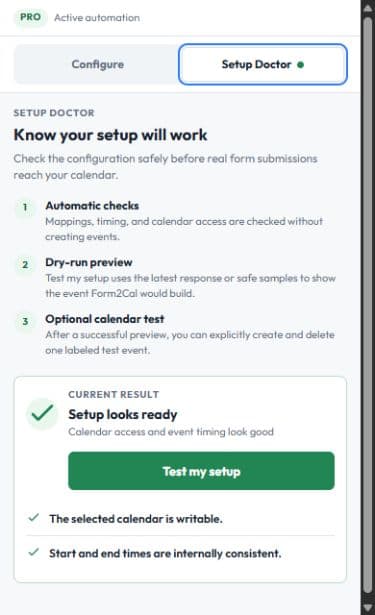
The Form2Cal sidebar now separates configuration from testing. Configure your calendar and mappings, then open Setup Doctor to check the workflow without guessing what the next response will do.
Automatic checks run when the sidebar opens and important settings change.
Test my setup builds a dry-run event preview without creating a Calendar event.
Fix opens the exact setting that needs attention and focuses the affected field.
After a successful preview, you can optionally create and delete one labeled test event.
Workflow options
Choose the Form2Cal workflow that matches your form
Start with the outcome you need, then use the matching setup and testing guidance before connecting a live form.
Form-to-calendar automation
Automate Google Forms to Google Calendar with Form2Cal. Map form fields once, check the setup, and create calendar events from new responses.
View workflowEvent registration workflow
Create calendar events from Google Forms event registrations. Form2Cal maps registration details into Google Calendar automatically.
View workflowAppointment automation
Automate appointment requests collected in Google Forms. Form2Cal creates Calendar events with the submitted date, time, guest, location, and notes.
View workflowGoogle Meet automation
Use Form2Cal Pro to create Google Calendar events with unique Google Meet links from submitted form dates, times, guests, and meeting details.
View workflowMulti-day event support
Map start dates, end dates, times, guests, and descriptions so each Google Form response creates the right all-day, timed, or multi-day Calendar event.
View workflowZapier alternative
Compare Form2Cal, Zapier, and Make for Google Forms to Google Calendar: setup, event creation, testing, and when each workflow is the right fit.
View workflowSetup and troubleshooting
Use a practical guide before your first live response
Start with one form workflow
Install Form2Cal, connect one Google Form, and use Setup Doctor to preview the event before upgrading active usage to Pro.
Want Form2Cal configured for you?
Done-for-you setup starts at $199 for one real form-to-calendar workflow.