
7 min read
Google Forms Scheduling: Send Requests to Calendar
Use Google Forms for scheduling requests with Form2Cal. Collect dates and times, create Calendar events, and set clear expectations before confirming.
See the workflow before you build it
The video shows the exact sequence behind this guide: a Google Form response, the created Google Calendar event, and the Form2Cal setup that keeps the workflow running.
Use Google Forms to collect scheduling requests
Google Forms can collect appointment requests, including a preferred date, time, contact details and reason for meeting. With Form2Cal, each submission can also create a Google Calendar event so your team can review the request alongside its schedule.
This works for consultations, interviews, tutoring requests and internal meetings where someone reviews the requested time. Before building the form, decide whether you need requests for review or booking against live availability.
Can Google Forms be an appointment scheduler?
You can use Google Forms for scheduling intake: collecting when someone wants to meet and what they need. Form2Cal creates a calendar event from those details. It does not check availability, hide occupied slots or prevent overlapping requests.
If people need to select an available time and book directly, Google Calendar appointment schedules provide a booking-page workflow. Choose Forms with Form2Cal when you need a structured request form and a calendar record for review.
1. Make the request process clear
Name the form Consultation Request or Interview Time Request. Explain what happens after submission, especially if a staff member must approve the time.
For example: ‘Choose your preferred date and time below. We will review your request and contact you to confirm availability. Submitting this form does not confirm an appointment.’ Use a similar message on the submission-confirmation screen.
2. Collect the details needed to review the request
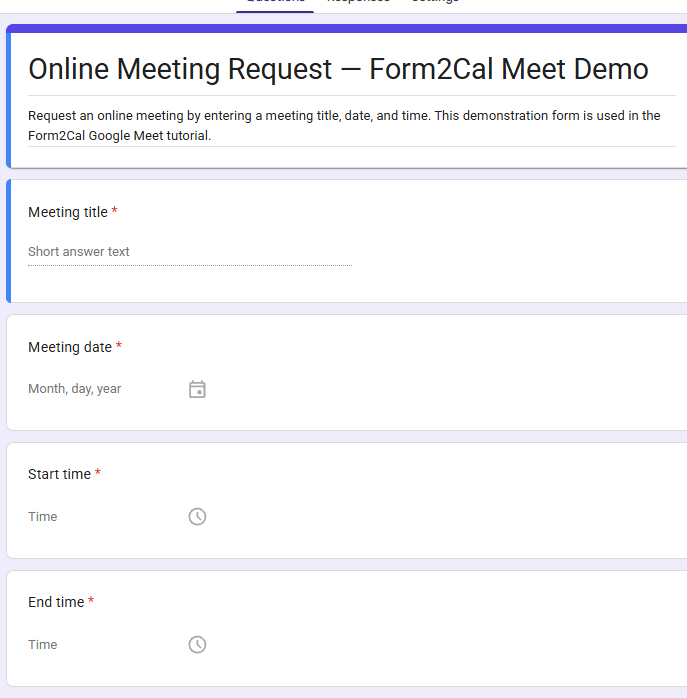
Use separate Date and Time questions, and make the scheduling fields required. Collect an end time when appointments vary in length. An answer such as ‘45 minutes’ can provide context, but it should not replace the End Time mapping.
For a fictional tutoring request, collect the subject Algebra help, the requested date, a start time of 3:00 PM, an end time of 3:45 PM and notes about what the student wants to cover.
- Name and email address for follow-up.
- Requested date, start time and end time.
- Meeting purpose, service or subject.
- Preferred office or location and additional notes.
3. Send submissions to an appointment requests calendar
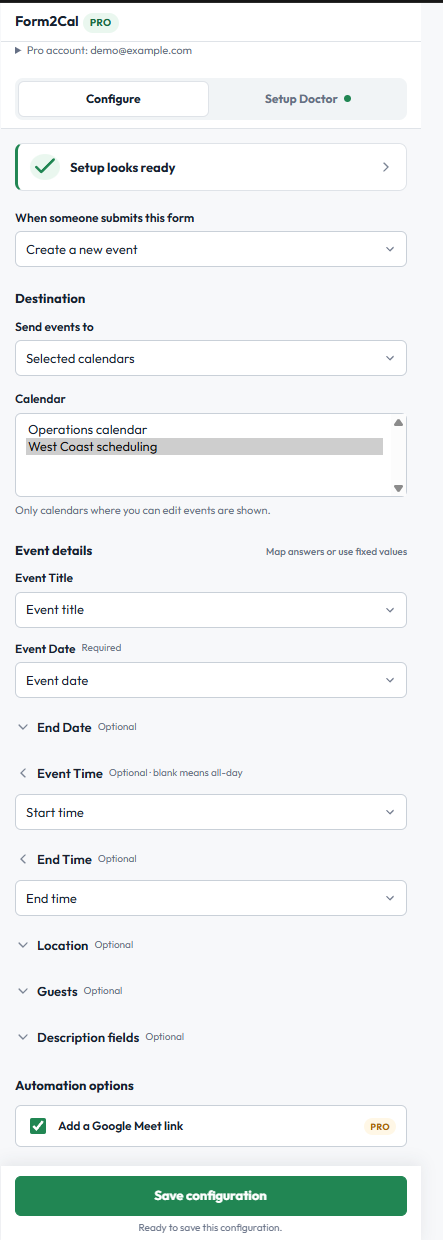
A separate calendar named Appointment Requests can help distinguish incoming requests from confirmed meetings. Open Form2Cal, choose Create a new event, then select that calendar under Send events to → Selected calendars.
Map Event Title to the meeting purpose, Event Date to the requested date, Event Time to the start time and End Time to the requested end time. Add the requester’s name, contact information and notes to Description fields.
Events are created immediately from submissions. The calendar name is an organizational convention: it does not add an approval step or conflict check. Your team still reviews availability and confirms the appointment.
4. Choose when the requester receives an invitation
For a request-first process, leave Guests blank and keep the contact details in the description. After checking availability, adjust the event if necessary and invite the requester manually.
If your process permits an immediate invitation, map Guests to Respondent’s Email or a dedicated email question. An invitation can look like a confirmed appointment to its recipient, so choose the behavior that matches the promise made on your form.
5. Route requests to the right team calendar
Form2Cal Pro supports Based on an answer routing for a dropdown or multiple-choice question. For example, an Office answer can send Downtown requests to one calendar and Online requests to another.
Assign the destinations and choose whether an unmapped answer should skip event creation or use an explicit fallback calendar. Routing selects a calendar; it does not choose available staff or check whether the requested time is free. Pro can also add a Google Meet link for online workflows.
6. Test the request from submission to review
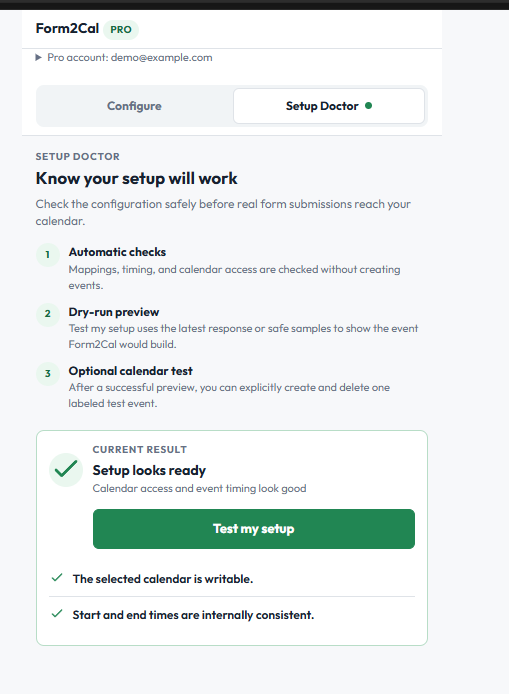
Open Setup Doctor and select Test my setup to preview the event. Check the requested time, destination and description, then save the configuration. Submit the form with fictional details and verify the resulting Calendar event.
Your team should be able to identify who requested the appointment, when they want to meet and how to contact them. If you enabled invitations, use your own email address for the test.
How to handle overlapping scheduling requests
Two people can request the same date and time. Form2Cal does not prevent the overlapping events. Assign someone to review requests, confirm availability and arrange alternatives when necessary.
If resolving conflicts becomes frequent, reconsider whether a live-availability booking page would better suit the process. For a request workflow, start with clear expectations, one destination calendar and a consistent confirmation step.
Frequently asked questions
Can I use Google Forms for scheduling appointments?
Yes, for collecting appointment requests. Form2Cal can create a calendar event from each response, while your team handles availability checks and confirmation.
Can Form2Cal show only available appointment slots?
No. Form2Cal does not turn form options into live calendar availability or prevent overlapping requests.
Can I collect extra information before a meeting?
Yes. Add questions for the meeting purpose, preparation needs and other details, then map useful answers to Description fields.
Will submitting the form automatically invite the requester?
Only if you configure the Guests field. For requests requiring review, leave Guests blank and invite the requester manually after confirming the time.
Form2Cal
Put this workflow to work
Start from the product page for setup details, or install the add-on from the Google Workspace Marketplace.